|
|
|

Overview
A Photo contains an "Image_uch" object, which in turn contains a Matrix_uch object. At the beginning, when a photo object is created, the x y coordinate of the lower left corner of the Image_uch, a member data of the photo, normally is set to (0,0) while the coordinate of the upper right corner is, says (520.000, 625.000) if no of columns = 520 and no of rows = 625. However, they can be different, for example when a portion of a photo is windowed out from the original photo. In this case the corner coordinates will carry the same coordinates as if they are in the original image. By this technique, any photo derived from the same photo, e.g. using window, skip etc., will have a same set of IO parameters.
Another important member data is a "Camera" object, in which essential information for interior orientation is kept. Moreover it has parameters to transform between image rectangular coordinate and photo coordinates, as well as between photo coordinate and ground coordinate, back and forth.
There are also three flags in a photo object, which will control whether corrections of the lens distortion, the earth curvature and the atmospheric correction be taken into consideration. Only the lens distortion correction is required to have, if any, others are computed by built-in models in Noobeed.
A photo object has its own save function, so that all member data are stored and be recalled anytime the photo is loaded. The brightness data value is store in a binary file, with a default extenstion of ".raw", while the documentation is stored in an ASCII file file, with a default extension ".txt". By this technique, the user can always understand information of a photo, and he can even modify it at will.
Member
data
|
Name |
Data type |
Meaning |
|
id |
int |
ID of photo |
|
name |
String |
name of photo |
|
Image |
Image_rgb |
a Image_rgb object |
|
camera |
Camera |
a Camera object |
|
IO_para12 |
Vector |
a vector contains parameters to
convert from image rectangular coordinate to photo coordinate |
|
IO_para21 |
Vector |
a vector contains parameters to
convert from photo coordinate to image rectangular coordinate |
|
EO_para |
Vector |
a vector contains exterior
orientation parameters of a photo |
|
numscale |
double |
an approximate scale number of a photo |
|
flag_rdd |
bool |
flag controls computaion of radial lens distortion 0=no 1=yes |
|
flag_earth |
bool |
flag controls computation of earth
curvature correction |
|
flag_refrac |
bool |
flag controls computation of
atmospheric correction |
|
flag_rotate |
bool |
flag rotation indicates the rotation angle of the photo object image, with respect to the original image in the digital camera. 0=no rotation 1=90 2 = 180 3=270 degrees counter-clockwise. |
When shooting an image, you can rotate the camera, landscape or portrait or any angle, and the X axis of the camera and the image will always stay together when loaded into computer. HOWEVER, sometines the loading image may not appear in the same way as it sat in the camera beacause people, for some reasons, do want to physically rotate the original image. TO LET Noobeed know that the image is not original but a rotated version of the original image, the user need to specify the rotation angle between the X-axis of the camera and the X-axis of the loading image correctly. Please use the L-function "FLAG_ROTATE" of the photo object to set this angle Prior to performing Interior Orientation (IO). For a newly initialized photo object, the default value of the rotation flag is 0, meaning no rotation. If the rotation flag is set to 1, 2 or 3, then Noobeed will know that the image of the photo object is not original. Please note that all images in the figure below belong to ONE SAME original image.
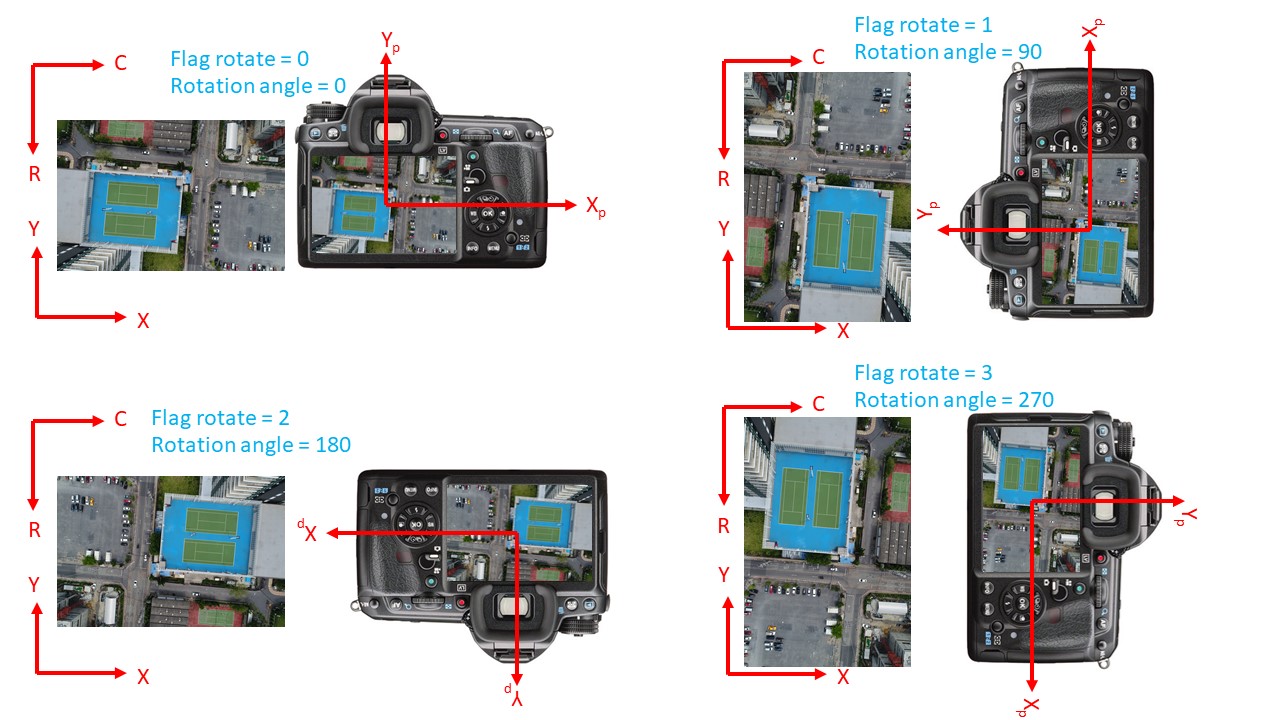
Note:
- Some functions of Photo use NUMSCALE in the computation, e.g. Erath curvature correction, Refraction correction, please make sure that the NUMSCALE value is correctly set before calling those functions and before turning on the flag controls for correction of earth curvature and refraction.
Operator
no operator provided
Construction function
{Photo} ret = PHOTO([{int} argm1, {int} argm2])
argm1 = no of row (default = 0)
argm2 = no of column (default = 0)
Example:
|
->Ph1 = Photo() |
an empty photo, with a default
camera. |
|
->Ph1 = Photo(100,200) |
an image with 100 rows and 200
columns, with a default camera. |
Lfunction
object({int} argm1, {int} argm2) = {uchar} left-value
argm1 = row index
argm2 = column index
object.ID() = {int} left-value
object.NAME() = {String} left-value
object.IMAGE() = {Image_rgb} left-value
object.CAMERA() = {Camera} left-value
object.IO_PARA12() = {Vector} left-value
object.IO_PARA21() = {Vector} left-value
object.EO_PARA() = {Vector} left-value
object.NUMSCALE() = {double} left-value
object.FLAG_RDD() = {bool} left-value
object.FLAG_EARTH() = {bool} left-value
object.FLAG_REFRACT() = {bool} left-value
object.FLAG_ROTATE() = {int} left-value
Example:
|
->Ph1(10,20) = 35 |
set value of element at row 10,
column 20
|
|
->cam_new = Camera() ->cam_new.load("cam_osu") ->ph1.camera() = cam_new |
set a new camera to the photo |
|
->Ph1.flag_earth() = 1 |
turn on the earth curvature
correction flag |
Class function
|
A-D |
E-H |
I-L |
M-P |
Q-S |
T-Z |
|
CAMERA |
|||||
| SAVE2SIM | |||||
| OCCLUSION | |||||
| FLAG_ROTATE | |||||
| FINDLINE | |||||
|
|
|||||
|
|
|||||
|
|
|
||||
|
|
|
||||
|
|
|
|
|
|
|
|
|
|
|
|
|
|
|
|
|
|
|
|
|
|
|
|
|
|
|
|
|
|
|
|
|
|
|
|
|
|
|
|
|
|
|
|
|
|
|
|
|
|
|
|
|
|
|
|
|
|
|
|
|
|
XPYP2DEM |
|
|
|
|
|
|
|
|
|
|
|
|
|
|
|
|
|
|
|
|
|
|
|
|
|
|
|
|
|
|
|
|
|
|
|
|
|
|
|
|
|